Racing Analyze GUI
Python · PySide6 · Multi-log telemetry analysis · Windows/Linux
Racing Analyze GUI is a packaged desktop workbench for loading multiple runs, aligning them to the same track gates, replaying data and media together, and extracting metrics for coaching-oriented review.
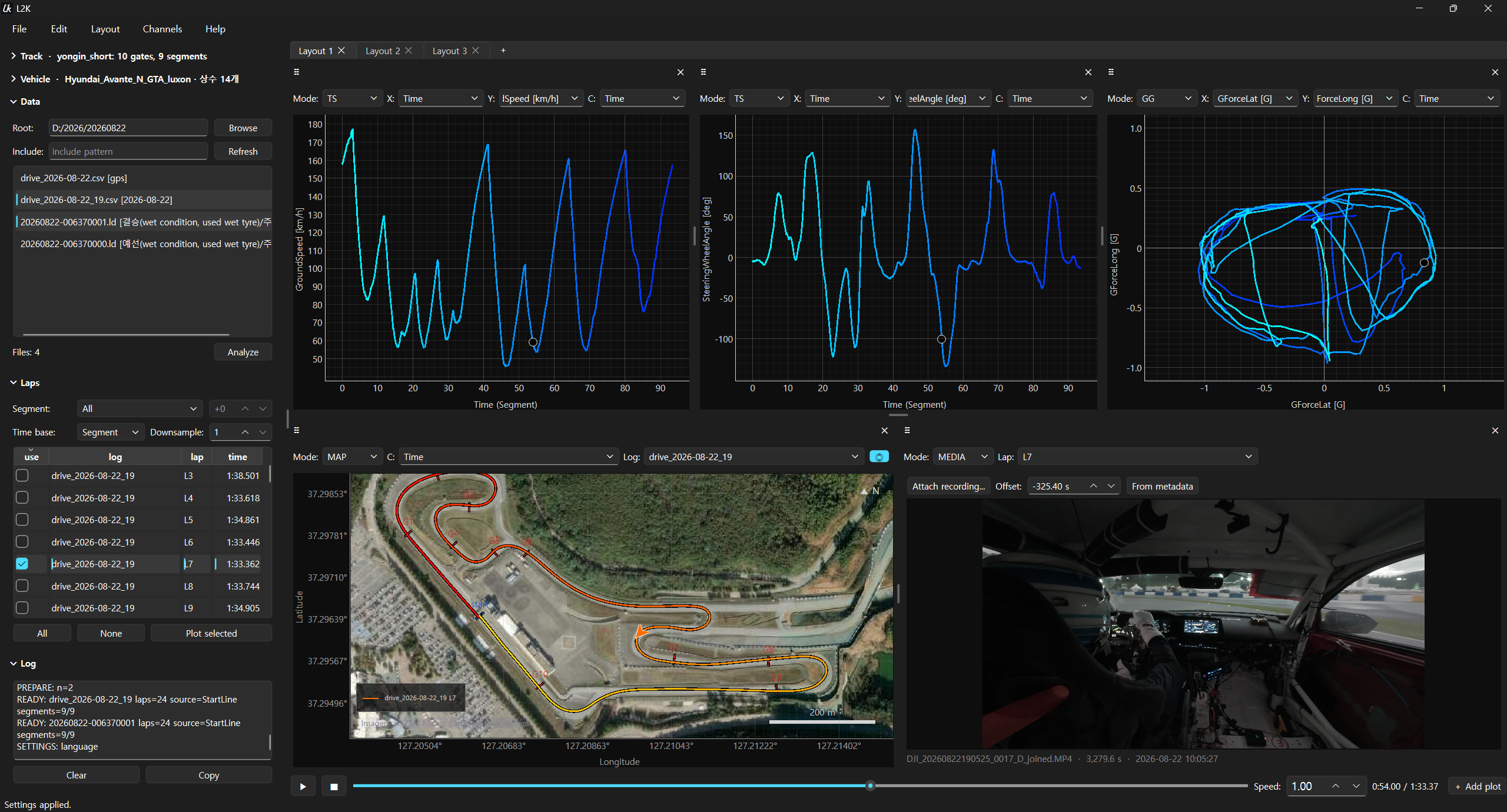
Current PySide6 workspace: multi-log time series, GG analysis, track map, and synchronized onboard video.
Workflow
Track Definitionstart line and segment gates in one reusable track file
→
Log LoadCSV, MoTeC LD, GPS, and simulator-coordinate runs
→
Gate Alignmentinterpolated lap and segment boundaries between samples
→
Replay + PlotsXY, TS, MAP, POLAR, KDE, GG, and synchronized media
→
Reportmetrics, time-loss decomposition, and CSV export
What I Built
- Physical gate alignment that interpolates each crossing between samples and applies the same boundary to timing, arrays, maps, replay markers, and video.
- Multi-log loading and caching for quick switching after one analysis pass, with configurable sampling rate for large sessions.
- Synchronized replay and media with time controls, pane-aware markers, recording-time estimation, and manual offset correction.
- Flexible pane system with XY, TS, MAP, POLAR, KDE, GG, and MEDIA views plus split, swap, pop-out, and undo operations.
- Channel-flexible visualization where arbitrary logged channels can be assigned to axes or color.
- Simulator-to-track registration that aligns planar simulator logs to real GPS tracks with rotation, translation, reflection checks, and residual diagnostics.
- Metrics and report export for segment time, speed and acceleration statistics, time-loss attribution, and selected-run comparison.
- Desktop and headless use through Windows/Linux build paths, a CLI, and a UI-independent Python analysis session.
Measured Behavior
- Sampling-rate-independent timing: a measured segment that differed at 100 Hz and 10 Hz becomes 7.805 s at both rates when gate interpolation is enabled.
- Memory scaling: on a 169-channel, 59-minute MoTeC export, 25 Hz used 108 MB versus 430 MB at 100 Hz while median lap distance changed by 0.3 m.
- Faster log parsing: documented port measurements reduced MoTeC CSV reading from 88 ms to 8 ms on the benchmark fixture.
- Automated checks: 699 unit tests and 533 integration tests cover analysis behavior and the Qt workflow.
Result & Evidence
- Made lap timing, plotted slices, map traces, replay markers, and media share the same gate-crossing convention.
- Connected real and simulator logs through a common track and analysis workflow.
- Handles four log families through one analysis path and checks them with generated equivalent-drive fixtures.
- The 1,232-test suite covers both calculation and Qt interaction paths; command-line smoke checks exercise gates, loss analysis, reports, and log inspection.
- Maintains Windows/Linux desktop builds plus CLI and UI-independent library access for automation.
- Consumes logs from the upstream Racing Telemetry Stack.
Validation Scope
- The performance figures above are repository-recorded measurements for specified fixtures and machines, not universal runtime guarantees.
- Simulator registration reports residual and scale diagnostics because a mathematically valid fit can still pair the wrong axes or laps.